Downloading FITS files and plotting a spectrum
You have found the observations you want — now get the spectra onto disk and
look at one. This tutorial queries a few NEID Level-1 frames, downloads
them in parallel, opens one with astropy.io.fits, and plots its extracted
flux against wavelength.
Note
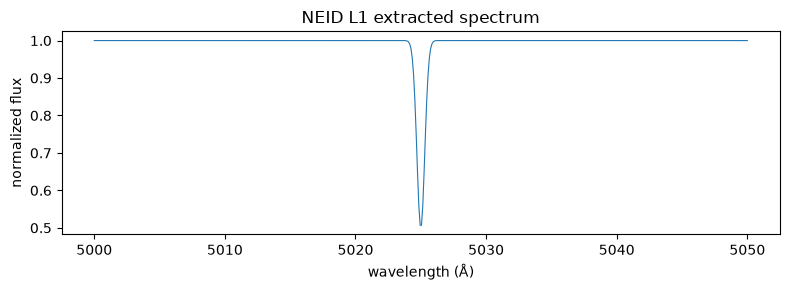
This notebook runs against the live NEID server. The published version here uses synthetic data so it builds without an archive account — no files are actually fetched, and the spectrum at the end is illustrative.
Why L1?
An L1 frame is a calibrated, wavelength-solved 1D extracted spectrum — the star’s flux at each wavelength, pulled out of the raw 2D detector image, with one spectrum per echelle order. It is the level you reach for when you want the spectra themselves (for custom line or activity analysis), as opposed to L2, which gives you the radial velocity the pipeline already measured. See Data levels.
Most NEID data is public and downloads without a login. Reaching data still
inside its proprietary period requires neid.login() with IPAC NEID
credentials — see Querying vs downloading, and proprietary data.
Query a small batch of L1 frames
from nexsci_rv import NEIDArchive

neid = NEIDArchive()

tbl = neid.query_datetime(
    "l1",
    ("2024-11-01", "2024-11-02"),
    columns=["l1filename", "l1filepath", "obsdate", "object"],
    maxrec=2,
)
tbl
| l1filename | l1filepath | obsdate | object |
|---|---|---|---|
| str27 | str35 | str19 | str9 |
| neidL1_20241101T031200.fits | /path/handle/neidL1_20241101T031200 | 2024-11-01T03:12:00 | HD 189733 |
| neidL1_20241101T032500.fits | /path/handle/neidL1_20241101T032500 | 2024-11-01T03:25:00 | HD 189733 |
We deliberately kept two columns that download needs:
l1filename— the name of each L1 FITS file.l1filepath— the server-side handle download uses to build the fetch URL.
If you narrow a result with columns= and drop these, download() cannot
locate the files. (obsdate and object are here just for orientation.) See
Understanding your results for the full set of
filename / filepath / filehand keys.
Download in parallel
download() returns the list of successfully downloaded paths. Partial
failures raise DownloadError after completing the others; the exception
carries a .failures list of (filename, exception) tuples for inspection.
workers=4by default (astronomy archives throttle aggressively).resume=Trueskips files already present at full size.progress=Trueshows atqdmprogress bar.
outdir = Path("data")
outdir.mkdir(exist_ok=True)

paths = neid.download(tbl, outdir=outdir, workers=2, progress=False)
for p in paths:
    print(p)
data/neidL1_20241101T031200.fits
data/neidL1_20241101T032500.fits
Open one of the FITS files
A FITS file holds the data itself plus header metadata. The header in
the primary HDU records what was observed (target, time, exposure, conditions),
while the L1 flux and wavelength arrays live in named image extensions —
hdul.info() lists them all. NEID L1 stores one row per echelle order, so we
read a single representative order to plot.
(Skipped in offline mode, since no file was actually downloaded.)
if OFFLINE:
    print("(skipped in offline mode — no file was downloaded)")
else:
    from astropy.io import fits

    with fits.open(paths[0]) as hdul:
        hdul.info()
        hdr = hdul[0].header
        for key in ("OBJECT", "DATE-OBS", "EXPTIME", "OBSMODE", "AIRMASS"):
            print(f"{key:>10s}: {hdr.get(key, '?')}")

        # NEID L1 stores the extracted spectrum as 2D arrays
        # (echelle order x pixel) in named image extensions. Pick one
        # representative order to plot. (Adapt the extension/order names if
        # your pipeline version differs; "SCIFLUX"/"SCIWAVE" are the L1
        # science arrays.)
        order = 60
        spec_flux = hdul["SCIFLUX"].data[order]
        spec_wavelength = hdul["SCIWAVE"].data[order]
(skipped in offline mode — no file was downloaded)
Plot the extracted spectrum
Finally, the payoff: flux against wavelength for one echelle order. You should see the continuum with narrow dark stellar absorption lines dipping below it — the very features whose Doppler shift the L2 pipeline turns into a radial velocity (RV). In offline mode we plot a single synthetic line so the figure renders without real data.
import matplotlib.pyplot as plt
import numpy as np

if OFFLINE:
    wave = np.linspace(5000, 5050, 500)
    flux = 1 - 0.5 * np.exp(-0.5 * ((wave - 5025) / 0.3) ** 2)
else:
    # from the opened L1 FITS HDU (the order extracted in the cell above)
    wave, flux = spec_wavelength, spec_flux

fig, ax = plt.subplots(figsize=(8, 3))
ax.plot(wave, flux, lw=0.8)
ax.set_xlabel("wavelength (Å)")
ax.set_ylabel("normalized flux")
ax.set_title("NEID L1 extracted spectrum")
fig.tight_layout()
Handling partial failures
If any file fails (network blip, 5xx after retries), download() raises
DownloadError carrying the successful paths in the underlying state and the
failed filenames in .failures. Catch it to recover what you can:
from nexsci_rv import DownloadError

try:
    paths = neid.download(tbl, outdir=outdir)
except DownloadError as exc:
    for name, err in exc.failures:
        print(f"failed: {name} ({err})")